Company Information
Call up the Company Information via the Tell Me function  . The following fields must be filled in here, depending on the public partner with whom documents are exchanged.
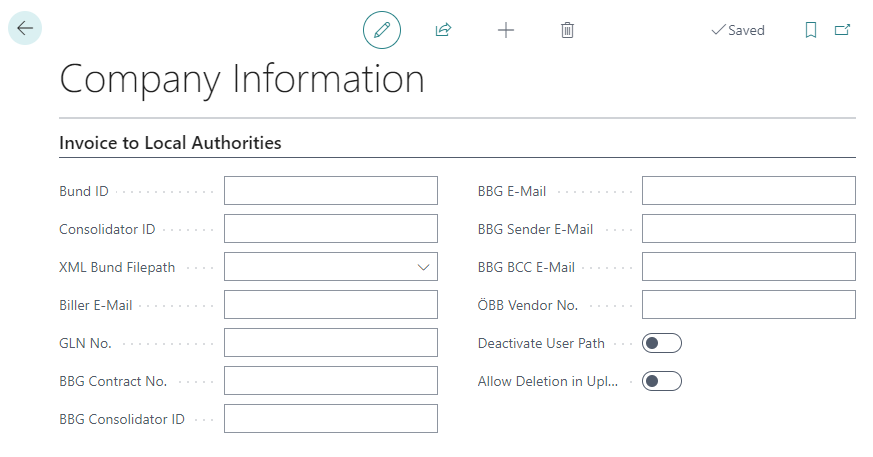
| Field | Description |
|---|---|
| Bund ID | The Bund ID of the customer (Company) is entered here. |
| Consolidator ID | Optional |
| XML Bund Filepath | Specification of the UNC-Path for storing the invoices / credit memos. If it is an E-Bund-Document, a subfolder "E-Bund" is created under the specified path. If it is a BBG document, a subfolder "BBG" is created under the specified path. |
| Biller E-Mail | E-mail address from which the invoices are sent or to which the reply from the Bund is sent. |
| GLN No. | Optional |
| BBG Contract No. | The BBG Contract No. of the customer (Company) is entered here. |
| BBG Consolidator ID | The BBG Consolidator ID of the customer (Company) is entered here. |
| BBG E-Mail | The E-Mail address of the Bund (BBG) is entered here. |
| BBG Sender E-Mail | The sender E-Mail address of the customer (Company) is entered here. BBG will then also send E-Mails back to this address, i.e. set up a general address. |
| BBG BCC E-Mail | The sender BCC E-Mail address of the customer (Company) is entered here. BBG will then also send emails back to this address, i.e. set up a general address. |
| ÖBB Vendor No. | The customer's supplier number at ÖBB is entered here. |
| Deactivate User Path | If this field is activated, a subfolder is created for each user. |
| Allow Deletion in Upload Queue | When activated, entries can be deleted from the queue. (e.g. an invoice should not be sent). |