Administration
Alpaca App Registrations
This is relevant for Alpaca's Azure DevOps integration only
Some Entra tenants are configured to not let users grant app permissions by themselves. In those cases, the Alpaca app registrations need to be pre-approved by an administrator in order for users to be able to log in to Alpaca and use its features. An Entra administrator can approve the required permissions by following this link and replacing <tenant-id> with the tenant ID of the Entra tenant:
https://login.microsoftonline.com/<tenant-id>/adminconsent?client_id=abed730b-114e-47a8-b905-1e116382469e
The following Enterprise applications will be automatically created in your Entra tenant by approving:
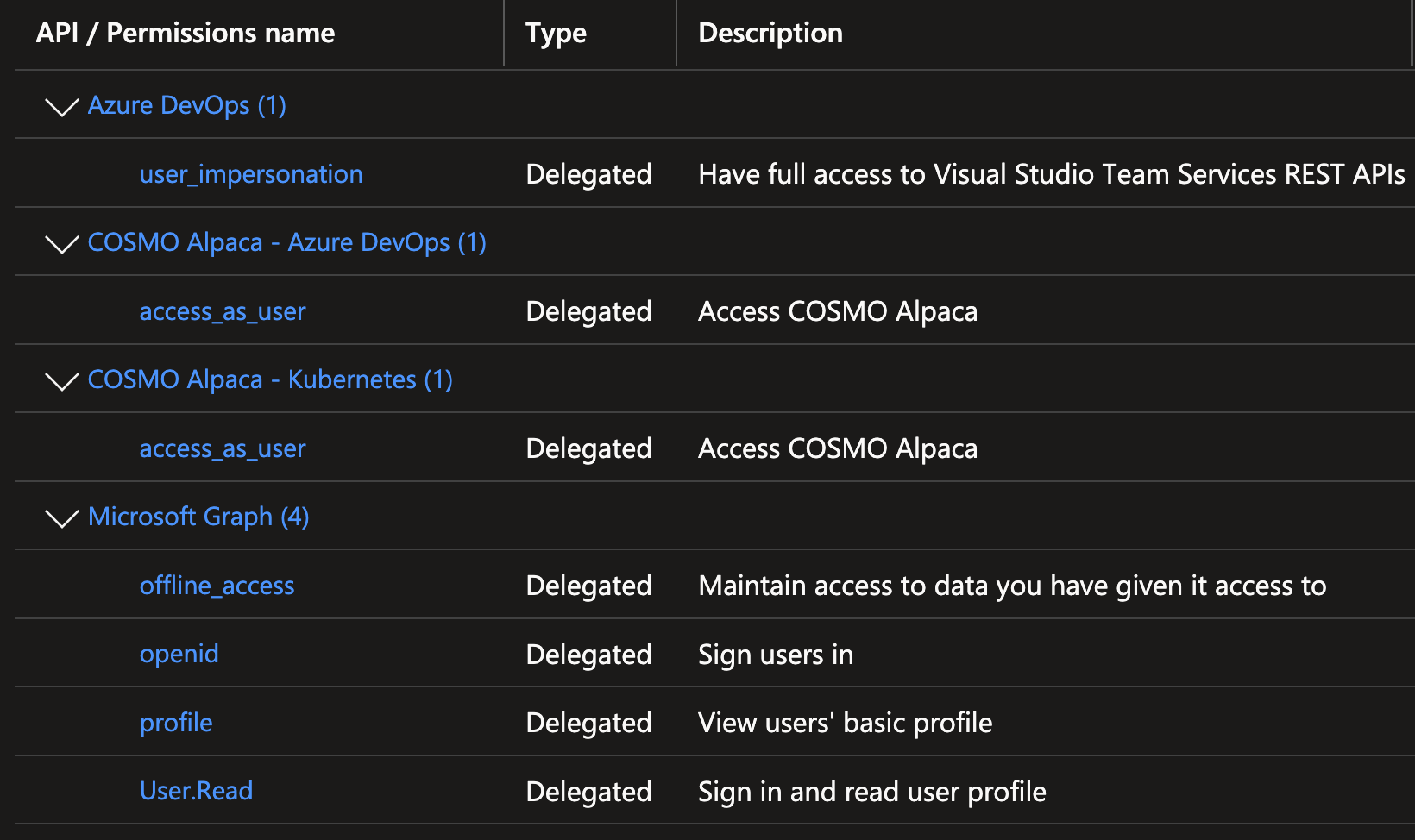
- COSMO Alpaca - VS Code: Signing in to Alpaca through VS Code with permissions to the Azure DevOps REST APIs, the user information via Graph and the Alpaca Backend APIs for Container management (Kubernetes) and Azure DevOps management:
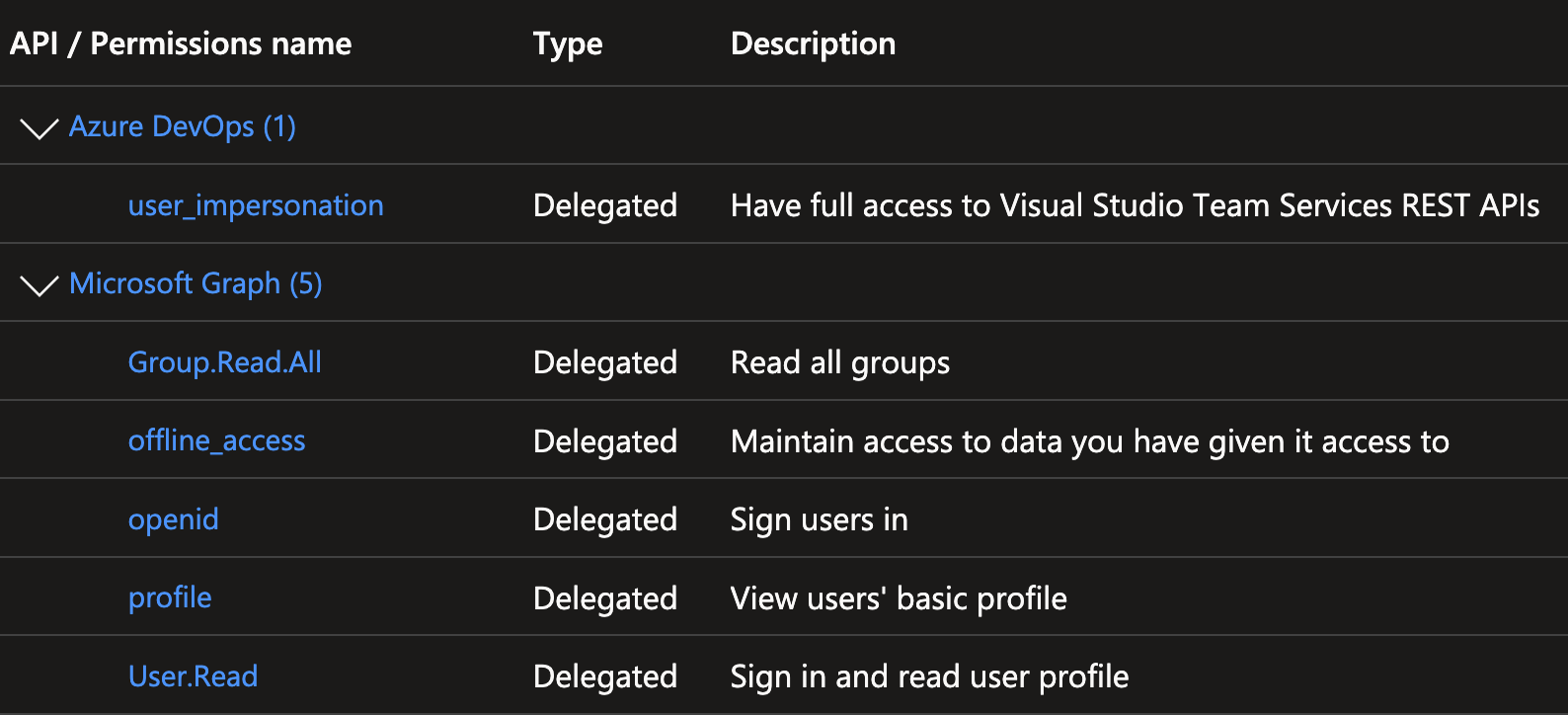
- COSMO Alpaca - Azure DevOps: Permissions for the Alpaca Azure DevOps management backend to access the Azure DevOps REST APIs and the user information via Graph on behalf of the signed-in user:
- COSMO Alpaca - Kubernetes: Permissions for the Alpaca container management backend to access the user information via Graph on behalf of the signed-in user:

Setting up licenses
Licenses are made available to the Self-Service through secrets. Those secrets contain anonymously accessible URLs to the *.flf or *.bclicense files and must be named after the following format:
devlic-<version>-<language>for.flffiles. Examples:devlic-bc19-de,devlic-bc18-fr-es,devlic-nav2018-de,devlic-nav2018-hu-w1dbclic-<version>-<language>for.bclicensefiles. Examples:dbclic-bc19-de,dbclic-bc18-fr-es
Secrets created with a different convention will not show up in the list of available configurations but you can still reference them in your cosmo.json for example as licenseFile or as customerLicense. This is handy when you have a project-specific license that you don't want to make available to all users.
IP Artifacts
The idea for the IP artifacts is to enable pipelines and the self-service to consume artifacts from a pre-configured Azure DevOps feed without the need to now where to find this feed or how to access it. This eases handling of regularly used packages and referencing those artifacts is simplified.
The name, organization and PAT must be stored as secrets:
| Name | Value |
|---|---|
ipartifacts__organization |
The name of the organization |
ipartifacts__feed |
The name of you feed |
ipartifacts__pat |
The PAT of a dummy user that has read access to the feed |
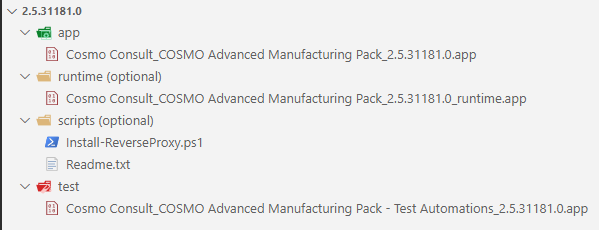
A package in the artifact feed must have the following folder structure:
| Folder | Content |
|---|---|
"app" |
app file of the main app |
"test" |
app file of the test app |
"runtime" |
app file of the runtime package |
"rapidstart" |
the rapidstart package belonging to the app |
Important
For now, you only get the full app with type "app", but in the future test apps, rapidstart packages or runtime packages might follow.
Configuring your backend for AAD authentication
If you want to use AAD authentication, so that e.g. users can log in to Business Central using their Microsoft work account, you need to create the required app registrations. As this is a quite complex process that also changes more or less frequently, we suggest to use the BcContainerHelper PowerShell cmdlets for the setup. To make the configuration of your backend easier, we provide the following script for your convenience, which sets up the app registrations through BcContainerHelper and puts them in the right place in your backend:
# the default name of the AD tenant with the app registration, which might be "yourcompany.onmicrosoft.com" or "yourcompany.com"
$tenantName = "<your tenant name>"

# the base URL of your backend
$backendUrl = "https://cosmo-alpaca-enterprise.westeurope.cloudapp.azure.com"

# prefix for the appIdUri. You only need to change this if you have multiple backends for your AD tenant. In that case, each one needs a different prefix
$appIdUriPrefix = "alpaca"

# if you need to switch users between creating / changing app registrations, set this to $true. This could also be needed, if you create the app registrations in a different tenant
$switchUsers = $true

################################
# no changes required after this
################################

$appIdUri = "https://$appIdUriPrefix.$tenantName"

Set-ExecutionPolicy -ExecutionPolicy Unrestricted -Scope Process
Import-Module bccontainerhelper -ArgumentList $true

if ($switchUsers) {
    Write-Host "Log in to Azure with credentials that have permissions to create app registrations in Azure AD for $tenantName"
    Connect-AzureAD
} else {
    Write-Host "Log in to Azure with credentials that have permissions to create app registrations in Azure AD for $tenantName"
    az login
    $adtoken_container = (az account get-access-token --resource-type aad-graph | ConvertFrom-Json)
    $adtoken = $adtoken_container.accessToken
    if ($adtoken.Contains(".") -and $adtoken.StartsWith("eyJ")) {
        $tokenPayload = $adtoken.Split(".")[1].Replace('-', '+').Replace('_', '/')
        while ($tokenPayload.Length % 4) { $tokenPayload += "=" }
        $jwtToken = [System.Text.Encoding]::UTF8.GetString([System.Convert]::FromBase64String($tokenPayload)) | ConvertFrom-Json
        Connect-AzureAD -AadAccessToken $adtoken -AccountId $jwtToken.upn | Out-Null
        Get-AzureADCurrentSessionInfo | Out-Null
    } else {
        Write-Error "Authentication failed"
        return
    }
}

# create AAD apps
$ids = Create-AadAppsForBC -appIdUri $appIdUri -publicWebBaseUrl "$backendUrl/BC" -useCurrentAzureAdConnection -SingleTenant -IncludeExcelAadApp -IncludePowerBiAadApp -IncludeEmailAadApp -IncludeApiAccess

# print relevant secrets for later configuration
foreach ($key in $ids.Keys)
{
    $secretName = "AAD-Auth--$key"
    Write-Host "Secret $secretName=$($ids[$key])"
}
Write-Host "Secret AAD-Auth--AppIdUri=$appIdUri"
Write-Host "Secret AAD-Auth--AppIdUriPrefix=$appIdUriPrefix"
Write-Host "Secret AAD-Auth--AadTenantName=$tenantName"

# add wildcard reply URLs
if ($switchUsers) {
    Write-Host "Log in to Azure with credentials that have permissions to change app registrations in Azure AD for $tenantName"
    az logout
    az login
}
az ad app update --id "$($ids.ApiAdAppId)" --add replyUrls "$backendUrl/*"
az ad app update --id "$($ids.EMailAdAppId)" --add replyUrls "$backendUrl/*"
az ad app update --id "$($ids.ExcelAdAppId)" --add replyUrls "$backendUrl/*"
az ad app update --id "$($ids.PowerBiAdAppId)" --add replyUrls "$backendUrl/*"
az ad app update --id "$($ids.SsoAdAppId)" --add replyUrls "$backendUrl/*"
Please note that you need to adapt the first couple of lines to your backend and can run it afterwards. Please also note that you will need permissions to create and modify app registrations.
If everything works as expected, the script will print 13 secrets that need to be added to a configuration file (please contact the Alpaca support). You should also get 5 new app registrations in your Azure Portal, all ending with for https://cosmo-alpaca-enterprise.westeurope.cloudapp.azure.com/BC/.
If you want to better understand which app registrations exactly are generated, you can check the sources. This script only adds wildcard reply URLs which is not strictly recommended, but the app registrations are limited to users from your own tenant, we deemed it an acceptable risk. The alternative would have been to create a Service Principal with the necessary permissions to create potentially those five app registrations for every container, which also isn't a great solution.
Customizing the settings for new app repositories
This is available for Azure DevOps only
Customers, who want to customize the template for new app repositories, should create a ConfigMap named appconfig with the desired values under the data section. This ConfigMap should be placed in the customer configuration repository.
The following values can be customized in the ConfigMap:
namepublisherprivacyStatementEULAhelpurlidRangesFromidRangesTologo(URL that will be downloaded as a file into the repository that is created)
Example ConfigMap
apiVersion: v1
kind: ConfigMap
metadata:
  name: appconfig
data:
  appconfig__name: "YourAppName"
  appconfig__publisher: "YourPublisher"
  appconfig__privacyStatement: "https://your-privacy-statement-url"
  appconfig__EULA: "https://your-eula-url"
  appconfig__help: "https://your-help-url"
  appconfig__url: "https://your-app-url"
  appconfig__idRangesFrom: "50000"
  appconfig__idRangesTo: "51111"
  appconfig__logo: "https://your-logo-url"
GitHub Repo Standards
This is available for GitHub only
When creating a new repo in VS Code, Alpaca automatically reads a variable ALPACA_REPO_STANDARDS and applies the standards defined there. The standards are also applied when running "Initialize" on an existing repository from VS Code. The variable can be defined on repository or on organization level to apply to all repositories.
Parameters
| Setting | Description |
|---|---|
HasWiki |
Sets whether to enable the wiki for the repository. |
HasIssues |
Sets whether to enable issues for the repository. |
AllowForking |
Sets whether to allow this repository to be forked or not. (only supported on organization-owned repositories) |
HasDiscussions |
Sets whether to enable discussions for the repository. |
HasProjects |
Sets whether to enable projects for the repository. |
AllowMergeCommit |
Allows the "Create a merge commit" merge method to be used. |
AllowSquashMerge |
Allows the "Squash Merge" merge method to be used. |
UseSquashPrTitleAsDefault |
Automatically set the title of squashed commits to be the PR title. |
AllowRebaseMerge |
Allows the "Rebase and Merge" method to be used. |
AllowUpdateBranch |
Sets whether to always allow a pull request head branch that is behind its base branch to be updated even if it is not required to be up to date before merging. |
AllowAutoMerge |
Allows the auto merge feature to be used. |
DeleteBranchOnMerge |
Automatically delete branches on PR merge. |
Note
All setting parameters are optional. If a parameter is not set, the corresponding setting will not be changed.
Example
{
  "HasWiki": false,
  "HasIssues": false,
  "AllowForking": false,
  "HasDiscussions": false,
  "HasProjects": false,
  "AllowMergeCommit": false,
  "AllowSquashMerge": true,
  "UseSquashPrTitleAsDefault": true,
  "AllowRebaseMerge": false,
  "AllowUpdateBranch": true,
  "AllowAutoMerge": true,
  "DeleteBranchOnMerge": true
}