Address Synchronization Setup
The Creditsafe Address Synchronization Setup is accessed via the search. In the search field, enter Creditsafe Address Synchronization Setup and select the corresponding link.
Address Synchronization Setup
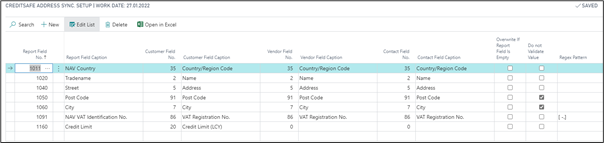
| Field | Description |
|---|---|
| Report Field No, | In the setup of Address Synchronization, you link the Creditsafe Report fields to your data fields of contacts, customers and vendors. For example, Creditsafe´s 1011 Business Central Country is corresponding to 35 Country/ Region Code in Dynamics Business Central in each respective business relation. You can add conditions and filters as usual using standard Business Central operators. |
| Report Field Caption | Report field name |
| Customer Field No. | In the setup of Address Synchronization, you link the Creditsafe Report fields to your data fields of contacts, customers and vendors. For example, Creditsafe´s 1011 Business Central Country is corresponding to 35 Country/ Region Code in Dynamics Business Central in each respective business relation. You can add conditions and filters as usual using standard Business Central operators. |
| Customer Field Caption | Customer field name |
| Vendor Field No. | In the setup of Address Synchronization, you link the Creditsafe Report fields to your data fields of contacts, customers and vendors. For example, Creditsafe´s 1011 Business Central Country is corresponding to 35 Country/ Region Code in Dynamics Business Central in each respective business relation. You can add conditions and filters as usual using standard Business Central operators. |
| Vendor Field Caption | Vendor field name |
| Contact Field No. | In the setup of Address Synchronization, you link the Creditsafe Report fields to your data fields of contacts, customers and vendors. For example, Creditsafe´s 1011 Business Central Country is corresponding to 35 Country/ Region Code in Dynamics Business Central in each respective business relation. You can add conditions and filters as usual using standard Business Central operators. |
| Contact Field Caption | Contact field name |
| Overwrite If Report Field Is Empty | If the check box Overwrite If Report Field Is Empty is activated and the Creditsafe report does not contain any such information, the NAV field will not be deleted. |
| Do not Validate Value | Any data do not validate from CreditSafe and the value is overwriting, responsible for Post Code and City. |
| Regex Pattern | It is also possible to manipulate the CreditSafe data using regular expressions. This makes sense, for example, to free the VAT-ID number provided by the CreditSafe with blanks so that the Dynamics Business Central specifications are met or to adapt telephone number formats to the master data specifications.Example of the "Search and Replace Expression" within Dynamics Business Central to free the VAT-ID number of blanks: Regex Pattern: [-.] Regex Replacement: This field be blank. |