Creditsafe Setup
The Creditsafe Setup is accessed via the search. In the search field, enter Creditsafe Setup and select the corresponding link.
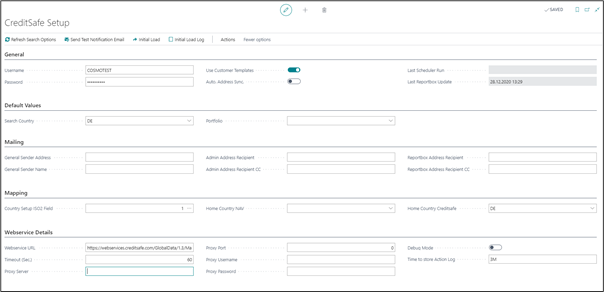
Fast tab General
The fields of the General fast tab are described in the following table.
| Field | Description |
|---|---|
| Username | Enter Username provided by your local Creditsafe Company |
| Password | Enter Username provided by your local Creditsafe Company |
| Use Customer Template | Can be enabled if you use these templates in your Dynamics 365 Business Central. Later when creating new customers via Creditsafe report, you can immediately assign them to one of them. |
| Auto. Address Sync | If a Creditsafe report is assigned to a customer and you receive a change of address from Creditsafe, this is automatically overwritten at the customer. |
| Last Scheduler Run | Date and time of the Portfolio update |
| Last Reportbox Update | Date and time of the Reportbox update |
Fast Tab Default Values
| Field | Description |
|---|---|
| Search Country | Enter your preferred search country as defaults as they will be preallocated later in online searches. |
| Portfolio | Enter your preferred Portfolio as defaults as they will be preallocated late in online searches. |
Fast Tab Mailing
| Field | Description |
|---|---|
| General Sender Address | General Sender Address and General Sender Name will be used for outgoing communications, e.g., creditsafe@yourcompanydomain.com. This functionality uses the Dynamics 365 Business Central standard smtp functions which has to be set up properly. |
| General Sender Name | General Sender Address and General Sender Name will be used for outgoing communications, e.g., creditsafe@yourcompanydomain.com. This functionality uses the Dynamics 365 Business Central standard smtp functions which has to be set up properly. |
| Admin Address Recipient | Admin Address Recipient and its Carbon Copy should be your IT Coordinators´ addresses. |
| Admin Address Recipient CC | Admin Address Recipient and its Carbon Copy should be your IT Coordinators´ addresses. |
| Reportbox Address Recipient | Reportbox Address Recipient and its Carbon Copy are used for notification emails, if a report or an answer to a request has been sent to your Reportbox by Creditsafe, usually the employees who gather credit reports. |
| Reportbox Address Recipient CC | Reportbox Address Recipient and its Carbon Copy are used for notification emails, if a report or an answer to a request has been sent to your Reportbox by Creditsafe, usually the employees who gather credit reports. |
Fast Tab Mapping
| Field | Description |
|---|---|
| Country Setup ISO2 Field No. | Choose the ISO2 code field from your Dynamics Business Central Countries/Regions table. If you do not use an ISO2 code, create a new field in the Countries/Regions table and fill it with the values. This field is needed to translate your Business Central country codes into the Creditsafe country codes, to search them correctly or if you want to create new customers. |
| Home Country Business Central | If you leave your specifics for country blank regarding your national business relations, choose your home country code here. |
| Home Country Creditsafe | Home Country Creditsafe has to be filled correspondently, but it must not be left blank. |
Fast Tab Webservice Details
| Field | Description |
|---|---|
| Webservice URL | Webservice URL to Creditsafe. Do not change this URL |
| Timeout (Sec.) | Number of seconds for waiting of webservice responds |
| Proxy Server | If you are using a proxy server, enter your proxy server. (Only for Dynamics 365 Business Central OnPrem) |
| Proxy Port | If you are using a proxy server, enter your proxy port. (Only for Dynamics 365 Business Central OnPrem) |
| Proxy Username | If you are using a proxy server, enter your proxy username. (Only for Dynamics 365 Business Central OnPrem) |
| Proxy Password | If you are using a proxy server, enter your proxy password. (Only for Dynamics 365 Business Central OnPrem) |
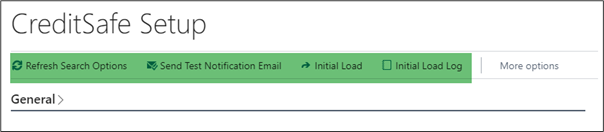
Functions Setup
| Field | Description |
|---|---|
| Refresh Search Options | Retrieving all keys from Creditsafe to use Creditsafe in Business Central. It is necessary to use this function, after entering the username and password from Creditsafe. |
| Send Test Notification Email | Send a test email. |
| Initial Load | Using for initial load of Creditsafe ID´s with linked customers, vendors, and contacts from Business Central from an Excel file. |
| Initial Load Log | Protocol from the initial load. |