Initial Load of Creditsafe reports
This this function you can load Creditsafe reports in COSMO Creditsafe you received bevor you used our solution.
Preparation in Excel sheet
1st Step:
Use Excel templates Creditsafe_Initial_Load_Customer and/or Creditsafe_Initial_Load_Vendor to fill our business contacts for initial load.
Example Excel sheet: Creditsafe_Initial_Load_Customer :
This Excel sheet contains three worksheets: Customer, Instructions and Reports
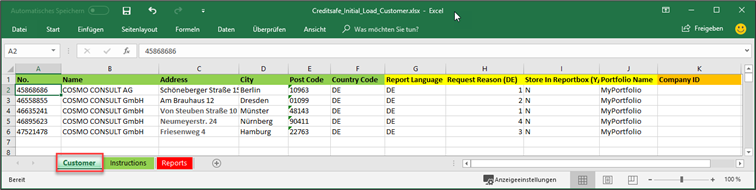
Customer:
The columns with the green highlighted captions must be fill with the business data of your customers. (Dynamics 365 Business Central customer number, name of the company, address, city, poste code, country code.
The columns with the yellow highlighted captions has to be filled in consultation with your Creditsafe consultant. (Report Language, Request Reason (DE) only for German companies, Store in Reportbox (Y/N), Portfolio Name).
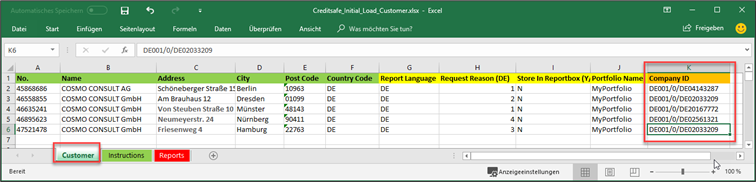
The columns with the orange highlighted captions there has to be filled only by Creditsafe.
Instructions:
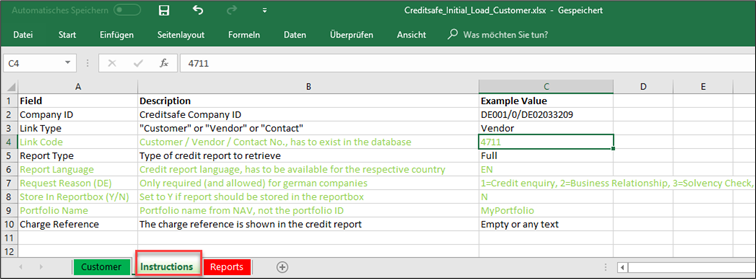
In this tab you find some hints to fill the tab Customer (marked in green)
Reports:
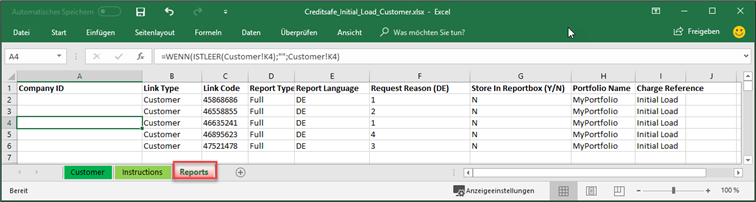
All relevant data are linked in this worksheet for the import in Dynamics 365 Business Central.
IMPORTANT:
Please do not make any changes in the structure and content of the Reports tab, otherwise the import into NAV and the initial retrieval of the reports will not work. All fields in the worksheet Reports are linked to row 4000.
2nd Step:
Send Excel sheet(s) to your Creditsafe consultant. He will add the Creditsafe-ID in the worksheet Customer and send it back for import in COSMO Creditsafe.
Import Excel sheet(s) in Dynamics 365 Business Central
1st Step:
Import Excel sheet in COSMO Creditsafe
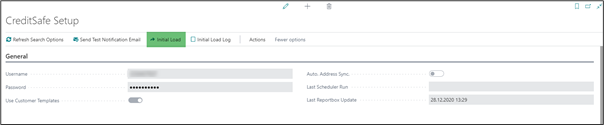
Navigate to Creditsafe Setup and use the function on Initial Load in menu bar. The Creditsafe Setup is accessed via the search. In the search field, enter Creditsafe Setup and select the corresponding link.
Creditsafe Setup
Creditsafe Initial Load
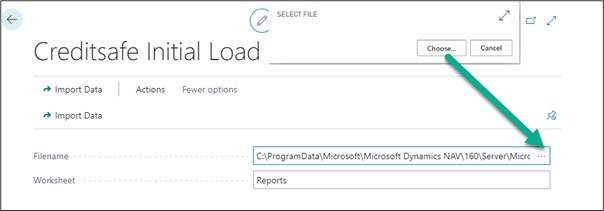
In the field Filename select the Creditsafe_Initial_Load_Customer.xlsx or Creditsafe_Initial_Load_Vendor.xlsx to import it in Initial Load Log.
IMPORTANT:
Do not change the name Reports in the field Worksheet.
Click on Import Data after selecting the excel sheet.
2nd Step:
Retrieve Creditsafe Reports in Creditsafe Initial Load Log
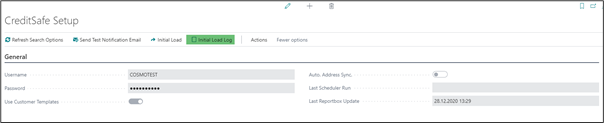

Here you can retrieve the Creditsafe reports from the excel sheet.
Button Retrieve Reports -> all reports in Initial load log are retrieved
Button Retrieve Reports (selection) -> selected reports in Initial load log are retrieved
Button Retrieve Reports (no PDF) -> all reports in Initial load log are retrieved without PDF
Button Retrieve Reports (selection – no PDF) -> selected reports in Initial load log are retrieved without PDF
IMPORTANT:
Before retrieve the reports please contact your Creditsafe consultant to cancel the limit for the report query.

The column Report exists will be set to yes after the import if the report is retrieved.
The column Error Text will show any errors after import. Please contact your Creditsafe consultant. After solving the problem, you can select the report(s) and go to Retrieve Reports (selection) to retrieve this report.
If you would like to retrieve reports for contact without link to vendors or Customers, please use the excel sheet Creditsafe_Initial_Load_Contact.xlsx otherwise it is sufficient to use the sheets Creditsafe_Initial_Load_Customer.xlsx and / or Creditsafe_Initial_Load_Vendor.xlsx.