Search Field Setup
The Creditsafe Search Field Setup is accessed via the search. In the search field, enter Creditsafe Search Field Setup and select the corresponding link.
Creditsafe Search Field Setup
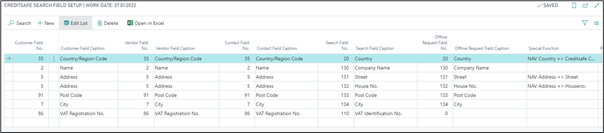
| Field | Description |
|---|---|
| Customer Field No. | Here, a field mapping is performed, which fields from CreditSafe are compared / suggested in the respective field for customers in an address comparison or adding for new business partners. |
| Customer Field Caption | Customer name of the field. |
| Vendor Field No. | Here, a field mapping is performed, which fields from CreditSafe are compared / suggested in the respective field for vendors in an address comparison or adding for new business partners. |
| Vendor Field Caption | Vendor name of the field. |
| Contact Field No. | Here, a field mapping is performed, which fields from CreditSafe are compared / suggested in the respective field for contacts in an address comparison or adding for new business partners. |
| Contact Field Caption | Contact name of the field. |
| Offline Request Field No. | Here, a field mapping is performed, which fields from CreditSafe are compared / suggested in the respective field for customers, contacts or vendors in an address comparison, or adding for new business partners. |
| Offline Request Field Caption | Offline Request name of the field |
| Special Function | Additional there is a field with special function for example to split the Dynamics 365 Business Central Address in Street and Houseno. |