Traffic Light Setup
The Creditsafe Traffic Light Setup is accessed via the search. In the search field, enter Creditsafe Traffic Light Setup and select the corresponding link.
Traffic Light Setup
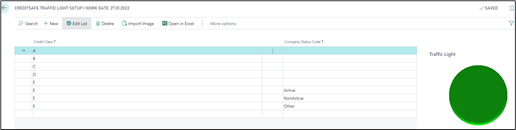
| Field | Description |
|---|---|
| Credit Class | Defines the credit class from A to E |
| Company Status Code | This column is needed because there might be no available Credit Class for a company at all, which does not necessarily mean that the customer is not solvent. The class received will be E, so additional parameters Active (not rate, cause to less information), NonActive and Other (pending) are needed. A neutral icon is advised. |
| Import Image | Of course, you can use different than these images if you like. After setting up the Credit Class ranges that best fulfil your needs, select each line, and press Import Image. Browse to the directory where the icons are located and select the corresponding image. |