Outbound Warehouse Request Line
The outbound warehouse request line list shows all the released and not yet handled outgoing request lines for planning the warehouse work. Starting from the request lines the warehouse users can plan and create the shipments, organize the work within the warehouse.
Prerequisites
The Whse Request Line setup
On the Location card, the Whse. Request Lines flag must be set to YES in order to have the source document lines on the Warehouse request lines to appear automatically.
By the release step of the source document, the whs. request line is generated.
On the source document's line, the user can see and edit the Warehouse request lines generated field.
This field is filled according to the Location setup, but the user can create exceptions.
If the Warehouse request lines generated field is NO on the source document line, the warehouse request line will be not generated.
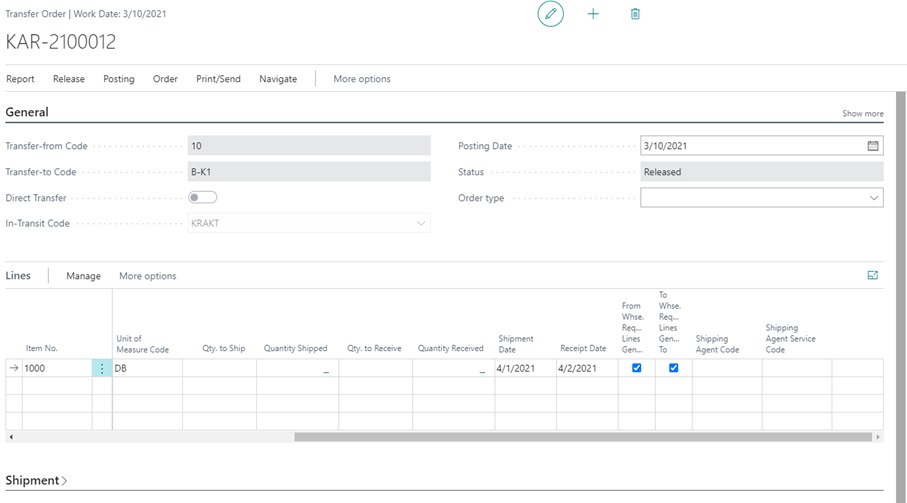
On the transfer order, two Warehouse request line generated fields are found, separately for the inbound and outbound warehouse tasks.
Logistics Setup: Due Date filtering
On the Logistics Setup page it is possible to set a filter in the 'Due Date Filtering on Outb. Whse. Req. Page' field, which determines which lines to show (compared to the workdate) when opening the outbound request line page and therefore also which lines to include in the warehouse shipment proposals.
Location Setup : Combining logic for the whse. shipment proposal
On the location card it is possible to define different rules for combining shipments which will be used in the Create Whse. Shipment Proposal function.

The setup will influence the warehouse shipment proposals, e.g. if Combine Shipment Destination is yes, all the warehouse shipments to the same destination will have the same proposal number.