CADLink
Every company working with CAD systems faces the problem of transferring data developed in CAD to Microsoft Dynamics 365 Business Central. With COSMO PDM CAD Connector the customer can create, update, or remove design data from the CAD in Microsoft Dynamics 365 Business Central.
Note
This topic provides an initial overview of the most important functions of CADLink. For more information, please contact the supplier QBuild.
The following figure illustrates how the connection between CAD and COSMO Product Data Management works.
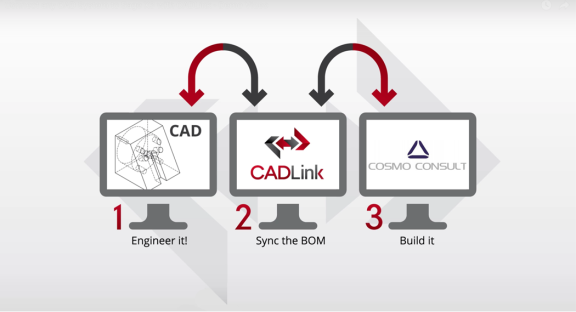
CADLink is to be understood as middleware between the CAD system and Microsoft Dynamics 365 Business Central. Web services are used to read information from both systems and compare it in CADLink.
To open CADLink and access files
CADLink is opened from a CAD, PDM, or PLM system and is installed there in the respective client.
Note
Different CAD systems may have a different appearance. However, the functionality of CADLink remains the same.
The following table describes the actions in the menu in the CADLink window.
| Action | Description |
|---|---|
| Open File | Opens an Explorer for searching a CAD file. |
| Close File | Closes the open file and returns CADLink to its initial state. |
| Run CADLink | Calculates the materials of the drawing and opens the CADLink BOM management. If a CAD system is connected, it is possible to use this function directly from the CAD system. |
After the file has been opened in the CAD system, choose the Run CADLink action to open the CADLink system.
When opening CADLink, the Web services are initialized, and all materials are derived from the CAD model, determined, and summarized in a BOM.
The following table describes a sequence of tasks, with links to the topics that describe them.
| To | See |
|---|---|
| Learn about the Bills of Materials tab on the CADLink window. | Bills of Materials |
| Learn about the BOM Changes tab on the CADLink window. | BOM Changes |
| Learn about the CAD Properties tab on the CADLink window. | CAD Properties |
| Learn about the CADLink Messages tab on the CADLink window. | CADLink Messages |
| Learn about the information in the CADLink Settings window. | CADLink Settings |
Feedback
Submit feedback for this page .