UDI Clinical Sizes
To set up the clinical sizes, standard Item Attributes are used. The setup of clinical sizes parameters can thus be used flexibly.
Important
Only Item Attributes with Type = Text, Integer, or Decimal can be used as clinical sizes. UDI-related fields are only visible when one of these types is selected.
The Item Attributes page is accessed using Tell Me. Choose the  icon, enter Item Attributes, and then choose the related link.
Clinical sizes can be added or changed directly in the Item Attributes list page; however, UDI specific fields are only accessible by choosing the Edit action to open the Item Attribute page.
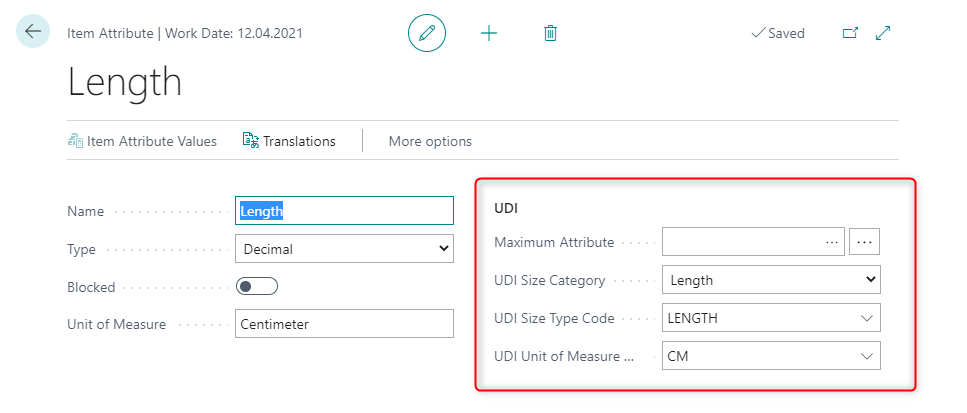
The fields in this page are described in the following table.
| Field | Description |
|---|---|
| Name | Specifies the name of the item attribute. |
| Type | Specifies the type of the item attribute. If Text, Integer, or Decimal is chosen, the UDI relevant fields are displayed. |
| Blocked | Specifies that the attribute cannot be assigned to an item. Items to which the attribute is already assigned are not affected. |
| Unit of Measure | Specifies the name of the item or resource's unit of measure, such as piece or hour. This field is only a text field and has no further functionality. |
| Maximum Attribute | Specifies another attribute to form a numeric range, whereas the current attribute marks the minimum. You can choose from non-blocked attributes of the same type and unit of measure, and without any assignment as minimum or maximum value. Shown when Type = Integer and Decimal. |
| UDI Size Category | Specifies a general size category (e.g., length) to facilitate the choice of the UDI Size Type and the UDI Measure Unit. This field references the Category field on the Size Types and Measure Units pages. Shown when Type = Text, Integer, and Decimal. |
| UDI Size Type Code | Specifies a size type according to the size category. You can only choose Size Types that are connected to the category you choose in the UDI Size Category field. If the UDI Size Category field is empty, the lookup for this field will be empty. Shown when Type = Text, Integer, and Decimal. |
| UDI Measure Unit Code | Specifies a measure unit according to the size category. You can only choose Measure Units that are connected to the category you choose in the UDI Size Category field. If the UDI Size Category field is empty, the lookup for this field will be empty. Shown when Type = Integer. |
| UDI Symbol Code | Specifies the symbol code the clinical size is linked to. Clinical sizes with a symbol code will be added to the symbol set entries upon printing. Shown when Type = Text, Integer, and Decimal. |
Tip
To form a numeric value range for EUDAMED, combine two item attributes of the same type, by entering the "higher" item attribute name into the Maximum Attribute field of the "lower" item attribute. The EU codes of the lower attribute will be exported.
CAUTION: Item attributes that are part of a range are not considered for exports to GUDID.
Feedback
Submit feedback for this page .