#MyCOSMO - Your ticket system
You can submit your inquiries to us via our MyCOSMO portal in the Tickets section.
The start page offers a dashboard and the "Tickets and CRs" section.
Alternatively, a drop-down menu is available at the top left. You can find the tickets here in the Support/Service area.
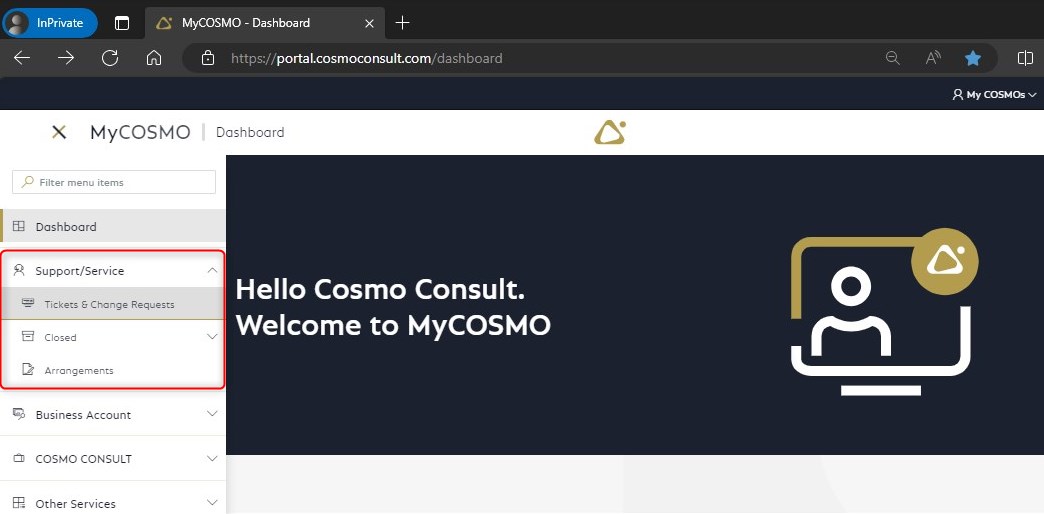
The "Tickets & Change Requests" menu item takes you to the overview of open tickets, while the "Completed" menu item takes you to the separate list of tickets that have already been completed.
General functionalities
In the ticket overview, you can filter, sort and set some view options.
Filter
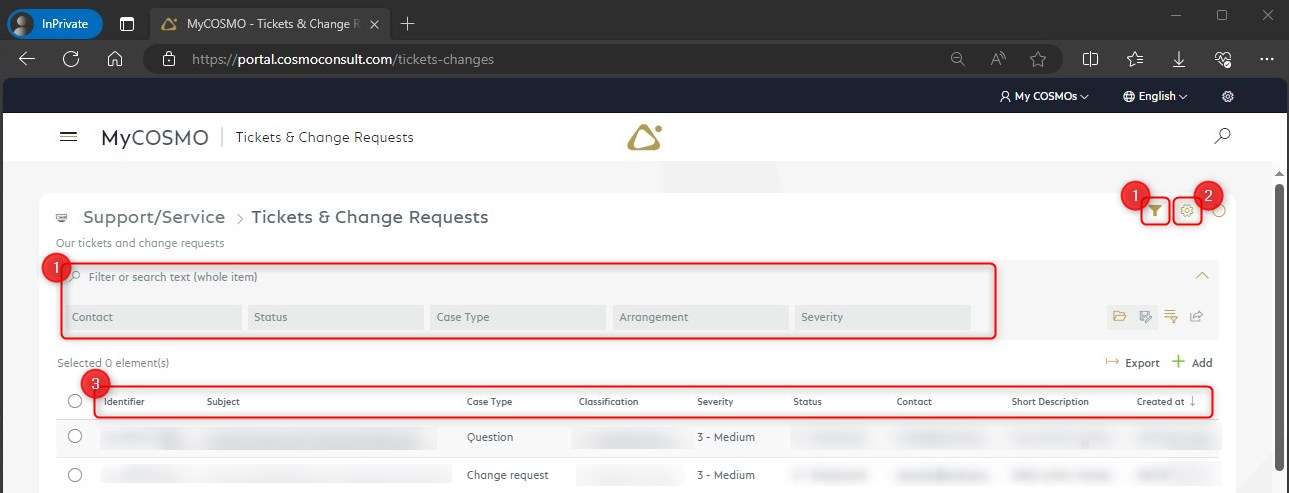
Quick filters (1.) are available for some fields in the ticket overview. Further filters are possible via the filter definition field below the quick filters. These filters are only possible for displayed fields
View options
The settings (2.) can be used to show and hide columns and switch between the list view and a map view.
Column order
Columns can be moved directly in the title bar (3.).
Sort
Sorting is possible directly by clicking on the header rows. Another click sorts the other way round.
Export tickets to Excel
Tickets can be transferred to Excel in the ticket overview.
You can find a quick overview of the main functions here: MyCOSMO presentation - YouTube