Walkthrough - Process an In-House Repair
This walkthrough shows a typical In‑House Repair process in COSMO Discrete Manufacturing – from return registration to final shipment – and includes the optional Repair Quotation (quote → approval → order) path. It covers cases with and without a predefined Service BOM.
This step-by-step process ensures full traceability, clean separation between service and production, and audit-ready documentation – from customer return to cost valuation.
Quick Decision Map
Follow the steps in this walkthrough based on these two paths:
Path A – Start with a Repair Quotation and follow steps A1–A10 if:
- You must present a costed offer before touching the item.
- The repair scope is estimated from history, photos, or preliminary diagnostics.
- Internal policy requires signed approval (warranty exclusions, out‑of‑scope damage).
- You want to lock pricing before production resources are reserved.
Path B – Skip the Repair Quotation and start with steps A7–A10 if:
- The repair is contractually covered (warranty/service level).
- Pricing is standardized or not customer‑specific.
- Turnaround speed is more important than formal approval.
Prerequisites / Checks
To complete this walkthrough, the following setup is configured/defined:
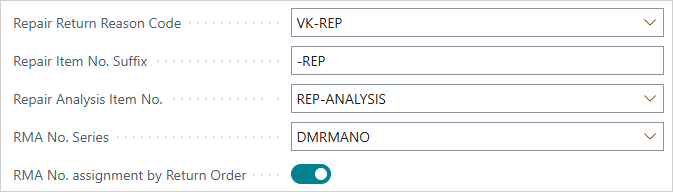
Repair-related fields in Configure to Order Setup page (Repair Return Reason Code, Repair Item Suffix, Repair Analysis Item No., RMA No. Series, and RMA No. assignment by Return Order).
Service Item master data and Service BOMs (if applicable).
Resources set with the correct Service Repair Prod. Order Type.
Serial/lot tracking if applicable.
Feedback
Submit feedback for this page .