Procurement for Raw Materials
The Item Disposal per Period function can also be valuable for specific procurement scenarios, such as:
- Managing similar raw materials represented by different items that should be grouped together for planning purposes.
- Handling long-running production orders where raw material requirements need to be procured gradually over the course of production.
Setup
To use raw material groups for similar items, you must set up new items for the raw material groups. Then, the raw material group item must be assigned to the similar raw material items. The corresponding items of a Raw Material Group are included in the Item Disposal per Period page of the Raw Material Group Item and below each other as replacement items.
The intended process is to use the Raw Material Group Items in the Production BOM of finished parts and to replace them after the production orders have been created using the Select Item Substitution function, which includes all relevant raw materials due to the Raw Material Group function.
Before production orders are released, a check is made to ensure that it does not contain any components that are set as a Raw Material Group Item.
To set up raw material items
- Choose the
 icon, enter Items, and then choose the related link.
 - Locate the raw material group item, expand the Replenishment FastTab and turn on the Raw Material Group Item toggle.
- Locate the raw material items that need to be included in the group and then select the group in the Raw Material Group Item No. field.
For example, create a new item RMG_P-3 as the Raw Material Group Item and then select RMG_P-3 in the Raw Material Group Item No. field for items P-30001 - P-30007.
Usage in Planning and Production
This section describes the usage of the Item Disposal per Period feature for planning and production.
Planning Scenario (Item Disposal per Period)
Once the raw material group is set up, the system consolidates planning data across all group members:
- On the Item Disposal per Period page, the Raw Material Group Item (e.g., Steel_Plate_S-1000) appears as a main line.
- All assigned items (e.g., Steel_Plate_S-1001, S-1002, etc.) are listed directly below it as alternatives.
- The system displays supply and demand data (inventory, purchase orders, production needs, etc.) for each item individually, allowing planners to:
- Monitor availability for the group as a whole.
- Compare lead times or delivery reliability.
- Choose the most suitable item for procurement or production.
This structure helps aggregate similar materials without losing the visibility of their individual availability.
Production Scenario (BOM and Substitution Process)
In production, Raw Material Group Items act as temporary placeholders in the Production BOM:
- The Production BOM for a finished good (e.g., MountainBike) includes the group item Steel_Plate_S-1000.
- When a Planned or Firm Planned production order is created from the BOM, the group item is copied into the production order as a component.
- Before releasing the order, the planner must decide which actual material to use:
- The user runs the Select Item Substitution function on the production order line.
- The system shows all items linked to the same Raw Material Group.
- The user selects, for example, Steel_Plate_S-1002, which replaces the group item in the production order.
Important
The system prevents the release of the production order if any Raw Material Group Items are still present. This ensures that only valid and procurable materials are used in execution.
Calculate Availability - Raw Material Group Items
When you run the calculation in the Item Disposal per Period page, any item marked as a Raw Material Group Item appears as a bold header line in the Disposition Type, Item, Item Description, and Item Description 2 fields.
The calculated values for this header line represent the combined totals of all items linked to the group:
- Inventory – Sum of current stock levels for all group items.
- Planned Supply – Sum of planned receipts (e.g., purchase orders, transfer orders, production outputs) for all group items.
- Demand/Need – Sum of requirements (e.g., sales orders, production components) for all group items.
Beneath the header, each linked raw material item is displayed as a separate, indented line. These detail lines show the availability calculation for the specific item, using the same period structure as the group header.
This structure lets you:
- Plan procurement for the entire group at once.
- Still review and compare availability for each individual item in the group.
- Identify differences between items (e.g., vendor-specific variants) while still being able to use them interchangeably in planning.
Example
The following screenshot shows a raw material group for screws (D-701X_RMG), which contains the individual items D-7017 and D-7019.
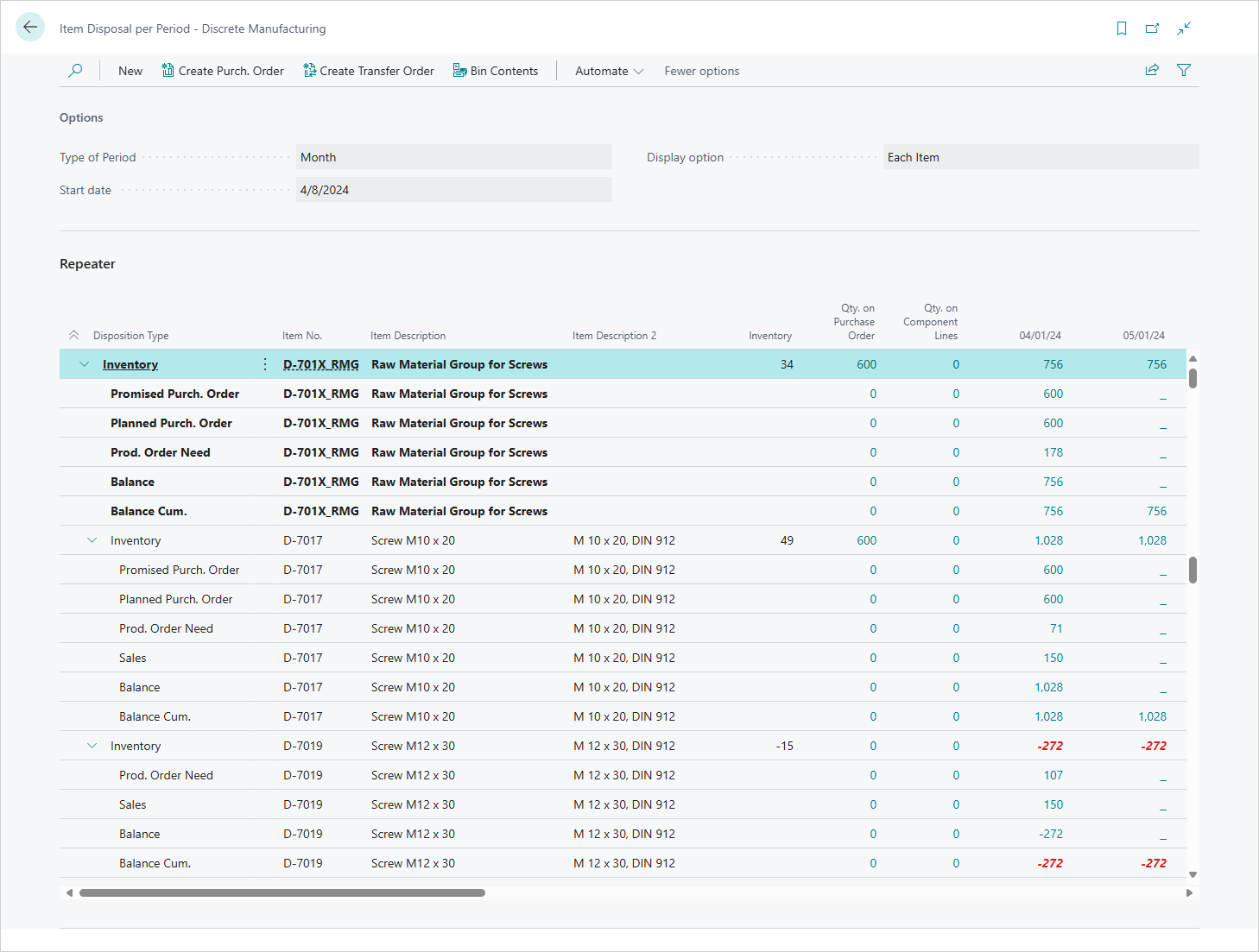
The raw material group line aggregates the total availability for all items in the group (Inventory = 34, plus other demand and supply lines), providing a consolidated view for planning purposes.
Below the group, each item is listed with its own availability data – for example, D-7017 has an Inventory of 49 units, while D-7019 shows a negative Inventory of -15 units. This breakdown allows planners to see both the combined group availability and the specific situation for each individual item.
Feedback
Submit feedback for this page .