Search Results for

    Show / Hide Table of Contents

    Rename Container

    If you want to rename a container, you can take the following steps:

    Important

    Renaming a container will restart the container if it runs.

    • GitHub (AL-Go)
    • Azure DevOps
    1. Right-click on the container you want to rename
    2. Select Rename
    3. Confirm that you want to rename the container which will restart a running container.
    4. Enter the new container name
    5. The container is renamed and automatically restarted so the change is applied
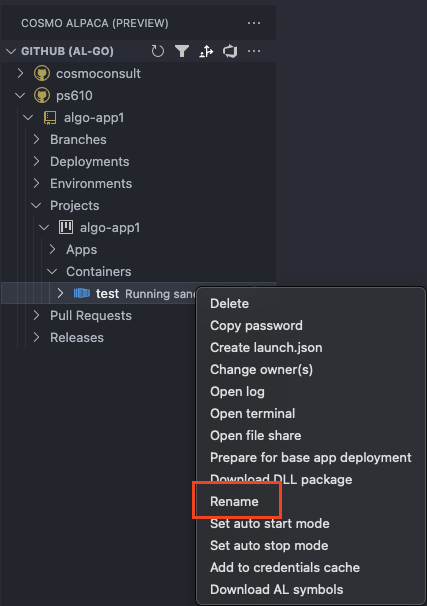
    Rename Container

    1. Click on the container to select it
    2. Open the command palette (F1) and choose COSMO Alpaca: Rename container (display name)
    3. Confirm that you want to rename the container which will restart a running container.
    4. Enter the new container name
    5. The container is renamed and automatically restarted so the change is applied
    Your browser does not support the video tag.
    In This Article
    Back to top 2025 © COSMO CONSULT - Data protection - Imprint