Cash Standard Reports
The Cash app ships with the pre-built Power BI reports below. Start with the Receivables page, then drill into the specialized reports.
Reports in this module
| Report | What it covers |
|---|---|
| Receivables (this page) | The central cockpit for monitoring open and overdue customer receivables based on Dynamics 365 Business Central data. |
| Receivable Details | Trend and cash-discount detail behind the receivable position. |
| Payables | The central cockpit for monitoring open and overdue vendor payables based on Dynamics 365 Business Central data. |
| Payables Details | Trend and cash-discount detail behind the payable position. |
Receivables
The central cockpit for monitoring open and overdue customer receivables based on Dynamics 365 Business Central data.
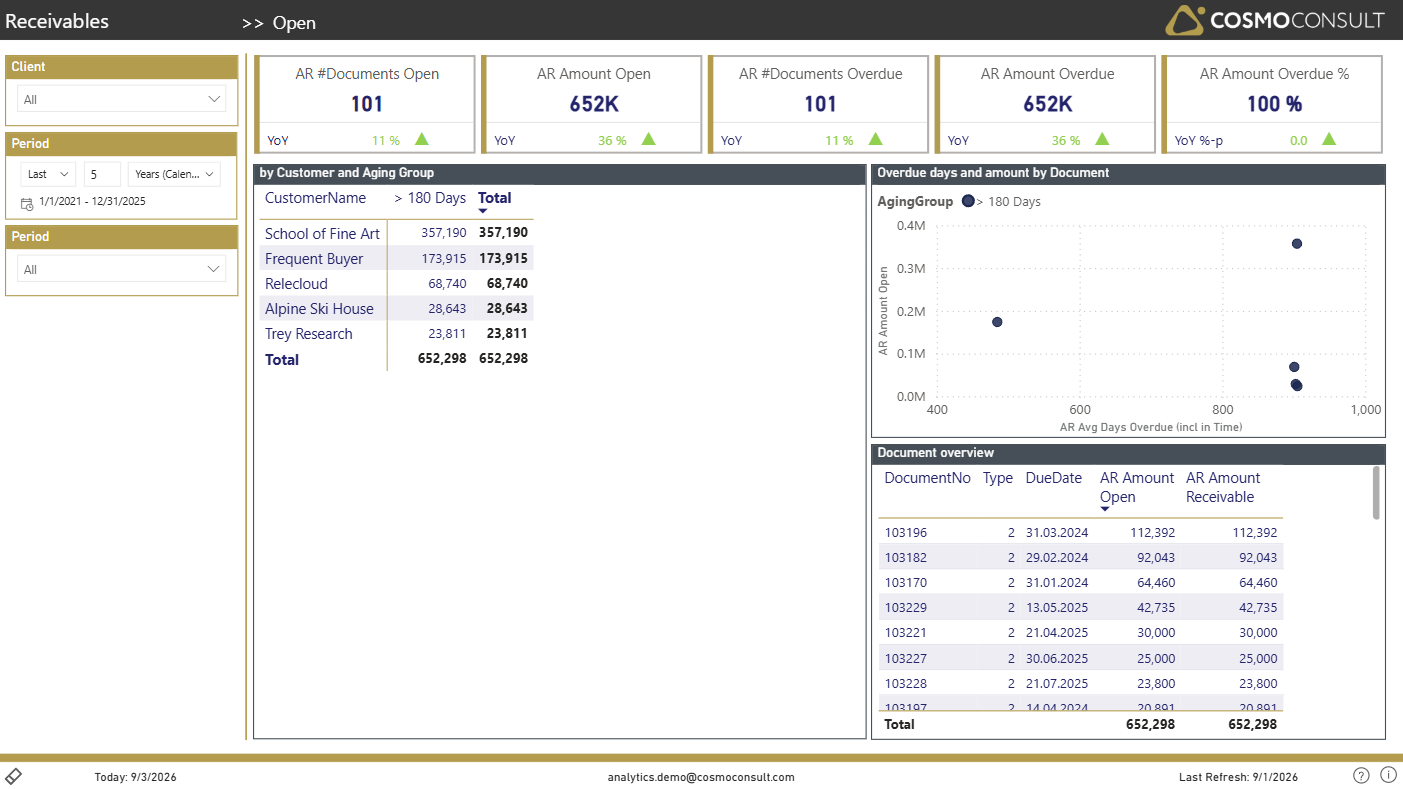
One screen to see how much customers owe, how much of it is overdue, and how the exposure spreads across ageing groups and customers - so you can focus collection effort where it matters most.
At a glance
Generated from the report definition (Receivables / Receivables).
- Key visuals: matrix, scatter chart, table
What this report helps you do
- See total open and overdue receivables at a glance
- Break the receivable balance down by ageing group and customer
- Spot the customers and documents that drive overdue exposure
- Prioritise collection activity by amount and days overdue
Filters & slicers
| Filter | What it does |
|---|---|
| Client Selection | Focus on a single company or compare legal entities in multi-tenant scenarios. |
| Period Selection | Analyze a rolling time frame or zoom into specific months, quarters or fiscal years. |
| Reference Date | Evaluate open and overdue balances as of a chosen reference (posting) date. |
Using these filters consistently ensures that all balances and ageing reflect the exact scope and as-of date you want to analyse.
Visuals on this page
Receivables KPI Card
Management-level view of the receivable position.
- AR Amount Open and AR #Documents Open size the total open receivables.
- AR Amount Overdue, AR #Documents Overdue and AR Amount Overdue % quantify the overdue portion.
Ageing Matrix
A matrix contrasts open receivables per ageing group and customer.
- Read open amounts per customer across ageing buckets
- Identify which customers concentrate the overdue balance
Overdue Scatter
A scatter chart relates average days overdue to open amount per document.
- Spot documents that are both large and severely overdue
- Prioritise the highest-risk open items for collection
Typical use cases
- Collection Prioritisation — Focus dunning and follow-up on the customers and documents with the highest overdue exposure.
- Working-Capital Review — Track total receivables and overdue share in recurring liquidity meetings.
Related KPIs
- AR Amount Receivable
- AR Amount Open
- AR Amount Overdue
- AR Amount Overdue %
- AR #Documents Overdue
See the full KPI & measure catalog for definitions and formats.