Setup of Text Module within Logistics
For detailed setup, configuration, and usage information about COSMO Text Module, see the COSMO Text Module Help.
The basic setup for Logistics Text Module integration can be easily initiated from the Logistics Setup page.
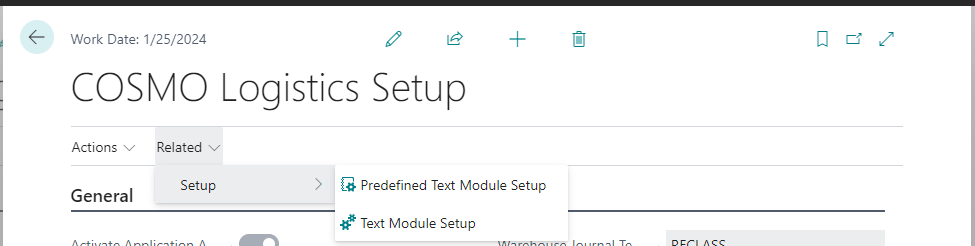
When running the Predefined Text Module Setup process, after confirming the initial setup for Logistics objects will be executed. This will:
create a specific 'LOGISTICS' text module area
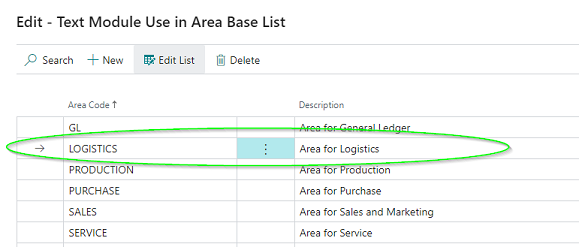
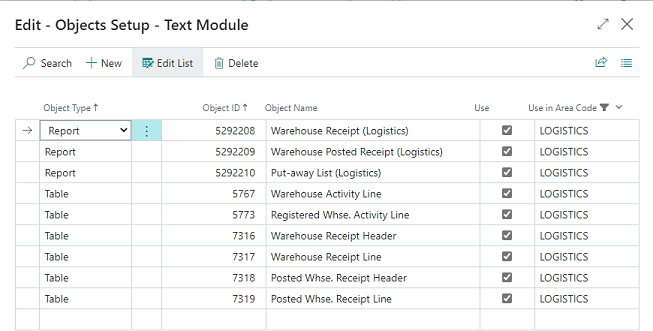
add all of the Logistics supported objects
turn on the Text Module Logistics Integration Activated toggle in Logistics Setup
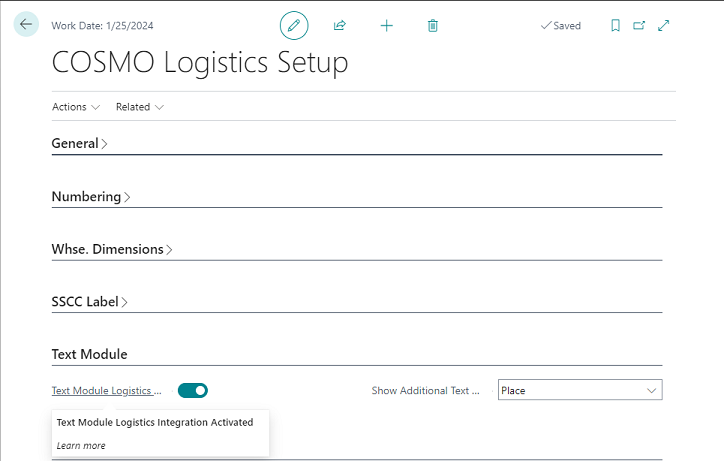
Although the toggle is turned on after this initiation function, the setup has not been finished and needs to get completed within the Text Module Setup itself.
- To navigate to the Text Module setup (to see the result of the predefined setup), choose Related > Setup > Text Module Setup in the Logistics Setup page.
- It is possible to skip the initiation function and do the setup completely manually. In this case the Text Module Logistics Activated toggle must be turned on manually as well.
Text Module FastTab
Other setup options related to Text Module integrations can be found on the Text Module FastTab.
| Field | Description |
|---|---|
| Text Module Logistics Activated | It is possible to skip the initiation function and do the setup manually. In this case the Text Module Logistics Integration Activated toggle must be turned on manually as well. It is also possible to de-activate the Text Module integration by turning off the toggle. When turned off, an error message is generated if Text Module supported reports are still being used in Report Selection - Warehouse. |
| Show Additional Text on Activity Type | With the Text Module integration, additional text related to items can be shown on warehouse related pages and reports. Some of the reports are related to the take and place activities, and with this parameter it is possible to determine how to print the additional text. The options are: - Place (default value): additional text will only be shown for the place lines. - Take: additional text will only be shown for take lines. - Take & Place: additional text will be shown for both activity lines. |
Feedback
Submit feedback for this page .