Test Plan Creation Agent (Preview)
The Test Plan Creation Agent is an AI-powered feature in COSMO Quality Assurance that reads supplier analysis certificates and transfers the extracted quality data into test plans in Microsoft Dynamics 365 Business Central. Instead of manually transcribing values from a certificate into a test plan, you upload the document, and the agent identifies and structures the relevant data – manufacturer, item description, lot numbers, validity dates, and measured test values – so you can review and use it directly.
Note
This feature is published as a Preview and may change in future versions. It is built on the Business Central Agent Designer and requires a SaaS Business Central environment with an active Power Platform connection. It is not available for on-premises deployments.
How It Works
The agent is activated once from the Quality Assurance Setup page using the Set Up Agent action. This creates the agent record, assigns the required permission sets, and links the CCS QA Quality Manager profile to the agent's dedicated user account. Running Set Up Agent again updates the existing agent rather than creating a duplicate entry. After setup, you manage who can use the agent from the same setup page.
The agent operates under the permissions and role center assigned during setup. It can only access the areas of Business Central that those permissions allow, and it works exclusively through the pages and actions available in the CCS QA Quality Manager role center.
When processing begins, the agent uses an instruction file together with page captions, tooltips, and visible data to navigate Business Central and write extracted values into the import buffer. Because it reads the UI directly, it can handle custom fields and property descriptions as long as they appear on the relevant pages.
Processing runs asynchronously after you upload a file, so you do not need to stay on the page. When the agent finishes, the task status changes to Completed and the import buffer is ready for review. If the agent cannot resolve a value automatically, it flags the task as Needs Attention and asks you to confirm or correct the value before continuing.
All values in the import buffer are AI-generated based on the uploaded document. Review them before creating a test plan.
How the Agent Processes a Certificate
- You upload an analysis certificate or specification document (CSV, XLSX, or PDF) via the Test Plan Upload for AI Agent dialog.
- The agent reads the document and identifies the relevant data points based on its instruction file.
- Extracted values are written into the Agent Analysis Import Buffer as a structured record with a header and lines for each test property.
- If the agent cannot resolve a value automatically, it flags the task as Needs Attention and prompts you to confirm or correct the value before processing continues.
- Once the import record is complete and you have reviewed it, you create the test plan with a single action.
Process Flow
The following diagram shows the typical flow of how work is divided between you and the agent.
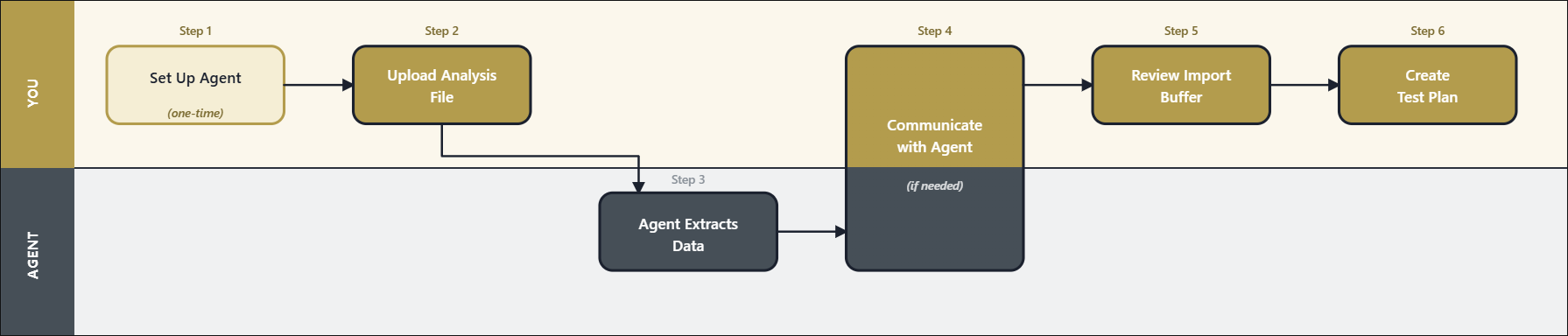
| Step | Who | What happens |
|---|---|---|
| 1 – Set Up Agent | You (one-time) | Activate and configure the agent in Quality Assurance Setup. |
| 2 – Upload Analysis File | You | Upload a certificate or specification file via the role center. |
| 3 – Agent Extracts Data | Agent | Reads the document and populates the import buffer asynchronously. |
| 4 - Communicate with Agent | You and Agent | If the agent needs input, it prompts you to review and confirm values, address issues, etc. |
| 5 – Review Import Buffer | You | Verify extracted values, resolve missing master data. |
| 6 – Create Test Plan | You | Confirm the prerequisite dialog and generate the test plan. |
Billing
The Test Plan Creation Agent uses Copilot Credits for AI processing. Copilot Credits are consumed each time the agent processes a document. The number of credits consumed depends on the size and complexity of the document.
The consumed credits for the Test Plan Creation Agent is approximately 30-40 credits per document processing. You can view the credit consumption details for a given range in the Agent consumption overview page, accessed from the Agents page by selecting the agent and then choosing the Consumption data action on the Related menu.
The agent is registered as Microsoft Billed, meaning billing runs through Microsoft's consumption-based model rather than a separate COSMO CONSULT charge.
Important
Billing setup is an IT administration task and must be completed before the agent processes documents. Without billing setup, a limited number of free Copilot credits may be available depending on your Business Central environment, but these are not sufficient for regular use.
For full billing documentation, see Manage consumption-based billing for agent capabilities in the Microsoft Learn documentation.
Next Steps
The following table outlines related tasks, with links to the topics that describe them.
| To | See |
|---|---|
| Activate the agent and configure who can use it. | Set Up the Test Plan Creation Agent |
| Upload analysis certificates, monitor agent processing, and create test plans from the imported data. | Create Test Plans Using the QA Agent (Preview) |
Feedback
Submit feedback for this page .